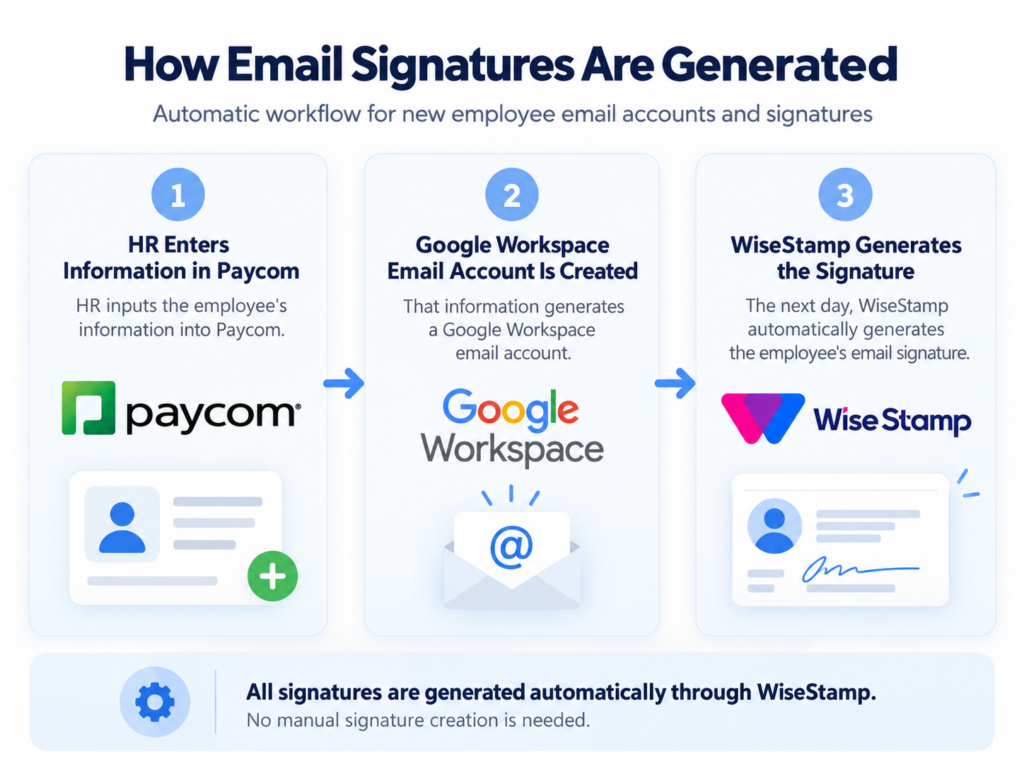
You can view and manage your signature in the Employee Hub. Please note that your signatures are generated automatically from Paycom. For those using Outlook or other services, instructions are available in the hub. (Hub video). For any corrections please contact HR.
Troubleshooting & Support
Mobile Users: If you have a signature set up on your mobile device, you’ll need to delete the old one for the new signature to appear.
Replying to Emails: If your old signature appears when you reply to an email, you may need to update your settings. In Gmail, go to Settings, find “Signature,” and under “ON REPLY/FORWARD USE,” select “My signature.”
Corrections: If your title, location, or other details are incorrect, please contact HR: Karina Marquez-robles k.marquezrobles@realjourney.org.
Technical Support: For any issues with WiseStamp, please contact Darius Tari at darius.tari@wisestamp.com.
The Signatures updates everyday. Once HR makes their update, it will update on WiseStamp the next day.