
Frequently Asked Questions
REAL Journey Marketing
Here’s a few of the most common questions we get listed below. If you don’t see what you are looking for, just….

Do we have a YouTube Channel?
We sure do! Check out https://www.youtube.com/c/
eMail Signatures
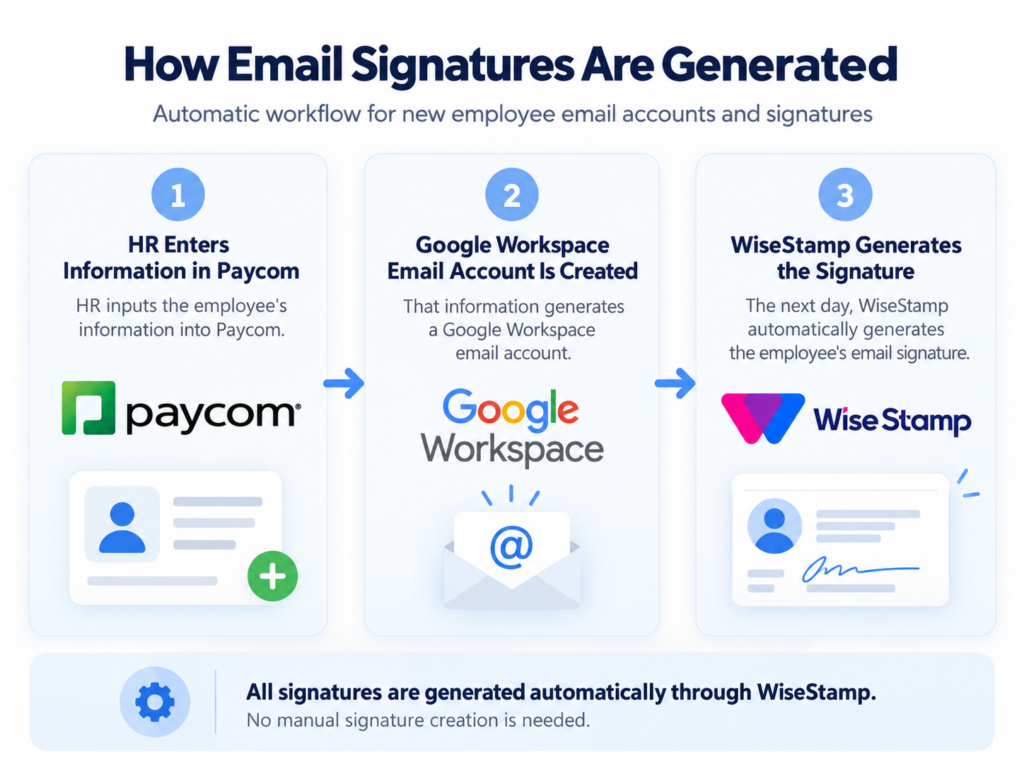
You can view and manage your signature in the Employee Hub. Please note that your signatures are generated automatically from Paycom. For those using Outlook or other services, instructions are available in the hub. (Hub video). For any corrections please contact HR.
Troubleshooting & Support
Mobile Users: If you have a signature set up on your mobile device, you’ll need to delete the old one for the new signature to appear.
Replying to Emails: If your old signature appears when you reply to an email, you may need to update your settings. In Gmail, go to Settings, find “Signature,” and under “ON REPLY/FORWARD USE,” select “My signature.”
Corrections: If your title, location, or other details are incorrect, please contact HR: Karina Marquez-robles k.
marquezrobles@realjourney.org. Technical Support: For any issues contact RJA Help Desk.
How to Fix Old eMail Signature on Reply
Click the Settings icon (gear icon in the upper right corner of Gmail).
Select “See all settings”.
Scroll down to the “Signature” section.
Under “Signature defaults”, look at the drop-down menu for “On reply/forward use”.
Click the arrow and change it to “My signature” (or “No Signature”).
Scroll to the very bottom of the page and click “Save Changes”.
For a visual walkthrough, you can watch this quick video tutorial.
If you have any issues, please contact IT for support. If you have already updated this, thank you for your time!
How are Payments for Toro Enterprises Handled?
Pay with your RJA spend card.
If they do not have one, forward invoice to your supervisor, who would pay with their spending card.